Repository navigation
Unable to open tests folder in file explorer after the test rescan, when using a pytest framework #6554

Description

Environment data
- VS Code version: latest release
- Extension version (available under the Extensions sidebar): latest release
- OS and version: Windows 10
- Python version (& distribution if applicable, e.g. Anaconda): 3.7.4
- Type of virtual environment used (N/A | venv | virtualenv | conda | ...): yes
- Relevant/affected Python packages and their versions: pytest latest release
- Jedi or Language Server? (i.e. what is
"python.jediEnabled"set to; more info How to update the language server to the latest stable version #3977): no
Expected behaviour
To not be hidden.
Actual behaviour
Hides the tests folder contents
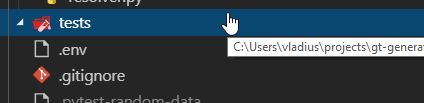
Steps to reproduce:
- Use a pytest framework in the project.
- Rescan the project for tests.
Activity
karrtikr commentedon Jul 16, 2019
Can you please right click
testsdirectory and selectReveal file in exploreroption. If the files are still there, this maybe a VSC issue as we do not control what to show in the test folder contents.skasch commentedon Jul 17, 2019
I have the same issue.
I did a couple tests; it looks like when the "Test" tab is open (the one with the erlenmeyer flask) to display the tests tree, this blocks the File Explorer tab from retrieving the files in the tests folder.
Would that point out to a VSC issue, rather than a Python extension issue?
karrtikr commentedon Jul 18, 2019
Romain Mondon Cancel (@skasch) Thanks for dissecting the issue. Unfortunately, I am not able to reproduce the problem with this info. Can you please provide a minimal setup to reproduce it? (i.e with file directory structure, file contents)
Screenshots and possibly GIF would help.
skasch commentedon Jul 19, 2019
I made a small, reproducible example of a Python project with tests for pytest here: testing_pytest_framework
Here below are the three steps that lead to the tests folder becoming invisible:
The problem actually arises whenever we open a test file from the "Test" tab directly.
EDIT: from the look of the third screenshot, looking at the full path (c:\users...) of the opened test file, it may be VSCode does not recognize that the file is inside the opened folder.
karrtikr commentedon Jul 31, 2019
Thanks for the info. The issue will be fixed along with fixing #6758.
[-]The tests folder becomes empty after the test rescan, when using a pytest framework[/-][+]Unable to open tests folder in file explorer after the test rescan, when using a pytest framework[/+]karrtikr commentedon Jul 31, 2019
Closing in favor of #6758