Repository navigation
react-native run-ios can not find any simulator #23282
Description

Environment
React Native Environment Info:
System:
OS: macOS 10.14.2
CPU: (12) x64 Intel(R) Core(TM) i9-8950HK CPU @ 2.90GHz
Memory: 6.76 GB / 32.00 GB
Shell: 3.2.57 - /bin/bash
Binaries:
Node: 10.15.0 - /usr/local/bin/node
Yarn: 1.13.0 - /usr/local/bin/yarn
npm: 6.4.1 - /usr/local/bin/npm
SDKs:
iOS SDK:
Platforms: iOS 12.1, macOS 10.14, tvOS 12.1, watchOS 5.1
IDEs:
Android Studio: 3.1 AI-173.4819257
Xcode: 10.1/10B61 - /usr/bin/xcodebuild
npmPackages:
react: 16.6.3 => 16.6.3
react-native: 0.57.8 => 0.57.8
npmGlobalPackages:
create-react-native-app: 1.0.0
react-native-cli: 2.0.1
react-native-git-upgrade: 0.2.7
Description
I have been facing an issue where 'react-native run-ios' can not start, regardless of the simulator I add to the --simulator argument.
XCode has the correct location for the 'command line tools'
I am always getting the error:
Could not find iPhone X simulator
Error: Could not find iPhone X simulator
    at resolve (/Users/eric/.../swim/node_modules/react-native/local-cli/runIOS/runIOS.js:149:13)
    at new Promise (<anonymous>)
    at runOnSimulator (/Users/eric/.../swim/node_modules/react-native/local-cli/runIOS/runIOS.js:134:10)
    at Object.runIOS [as func] (/Users/eric/.../swim/node_modules/react-native/local-cli/runIOS/runIOS.js:106:12)
    at Promise.resolve.then (/Users/eric/.../swim/node_modules/react-native/local-cli/cliEntry.js:117:22)
Reproducible Demo
Installed XCode from scratch.
Brand new 'react-native new app'
'react-native run-ios' always complain about not finding the simulator, regardless of the --simulator option.
My temporary fix is to change:
/node_modules/react-native/local-cli/runIOS/findMatchingSimulator.js
line 42, to:
if (!version.startsWith('**com.apple.CoreSimulator.SimRuntime.**iOS') && !version.startsWith('tvOS')) {
Activity
react-native-bot commentedon Feb 3, 2019
eric-PearSports commentedon Feb 4, 2019
just tried a brand new project with:
react-native: 0.58.3 => 0.58.3
and same issue
kelset commentedon Feb 5, 2019
react-native run-ios —device=“XXXXXX’osunnarvik commentedon Feb 5, 2019
I have the same issue here as well.
When I changed to
if (!version.includes('iOS') && !version.includes('tvOS')) {
continue;
}
all is well, since the prefix "com.apple.CoreSimulator.SimRuntime." is included in the device-list, the pure check for startsWith fails for all simulators.
osunnarvik commentedon Feb 5, 2019
I created pull request #23293 for this issue
kelset commentedon Feb 5, 2019
Hey @osunnarvik thanks for creating the PR! Could you explain bit more (maybe in the PR) why is this happening now? I mean, when did the prefix changed? In latest Xcode? 🤔
osunnarvik commentedon Feb 5, 2019
I have updated the description of the PR now to say a bit about when it startet happening and added some version information of XCode and xcrun
eric-PearSports commentedon Feb 5, 2019
@kelset yes, I believe the format of the list of devices has changed with the latest XCode.
kelset commentedon Feb 5, 2019
Awesome - thanks folks :)
We have already merged the PR to 0.58 (since 0.59 etc will have the CLI separated) and next patch release (0.58.4) will have the fix 💪
osunnarvik commentedon Feb 5, 2019
@kelset I noticed the comment in react-native-community/cli#138 regarding when you specify the simulatorString (comment from @canterberry ). I only checked with empty simulatorString and not with one set. Let me know if you would like me to take a look at the case where the simulatorString is set.
88 remaining items
pincodebibi commentedon Oct 2, 2019
When you open .xcodeproj file in ios folder it will start Xcode IDE and there you will be able to choose particular simulator.
See screenshots below.
You can choose device from this list.


But if you do not see iPhone X you can easily add it to your list of devices.
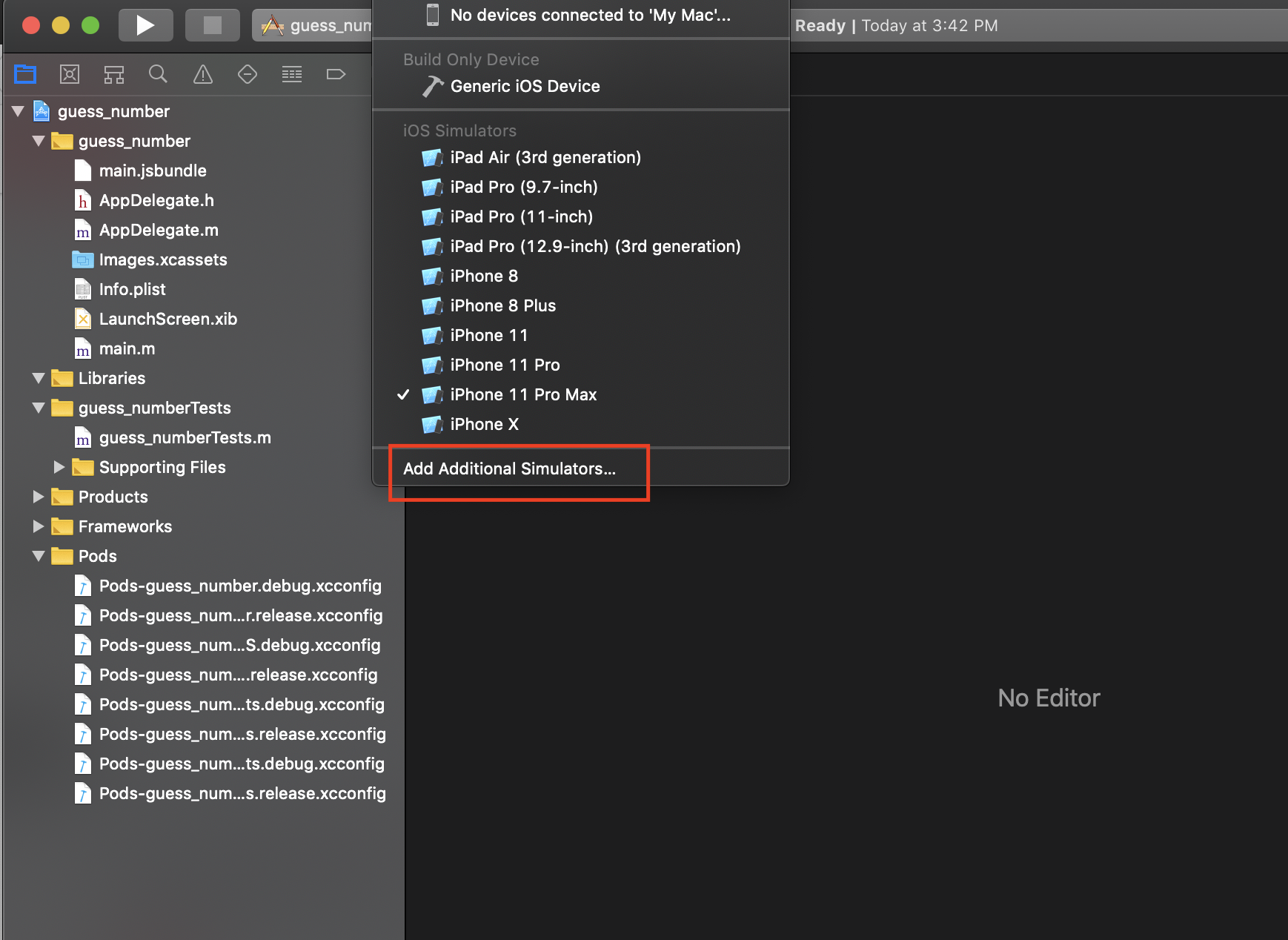


If you have any questions let me know.
Thanks.
marcosalberto commentedon Oct 3, 2019
If doesn't work after add iPhone X simulator in XCode
yarnornpm installlucianomlima commentedon Oct 4, 2019
Delete lock files may be problematic under certain circumstances. Do it carefully
avtarnanrey commentedon Oct 13, 2019
If you just want to run any specific device. It might be missing in Simulators list. To add a device do the following steps:
Command+Shift+2it will open Devices & Simulators option.nanadjei commentedon Oct 19, 2019
Please kindly try this solution. It might work for you.
#24450 (comment)
robincsamuel commentedon Oct 26, 2019
I found this the simplest,
react-native run-ios --simulator "iPhone 11 Pro Max"jamonholmgren commentedon Nov 5, 2019
This doesn't seem to be a problem anymore for me. Maybe some update in the meantime fixed it?
njt1982 commentedon Nov 22, 2019
@danielcampo 's suggestion of upgrading the CLI fixed it for me.
I had to add this to my package.json:
"@react-native-community/cli": "@^1.12.0",as, for some reason, the lock wouldn't upgrade paste 1.11.2 without it.Now it finds simulators without problem.
fvmsantos commentedon Nov 28, 2019
This worked to me! Thanks guy!
Attempt to fix issue with simulator not being found
McMainsLiam commentedon Jan 9, 2020
If someone is still looking for the
findMatchingSimulator.jsfile to manually edit it, you can currently find it at this path:node_modules/@react-native-community/cli/build/commands/runIOS/findMatchingSimulator.jsI hope this helps someone down the line!
kelvinlemus commentedon Jan 26, 2020
Also remember to pass IOS version within parenthesis:
--simulator "iPhone 11 Pro Max (13.2)"anastely commentedon Feb 10, 2020
@kelvinlemus I have
And i want to change default simulator "iPhone X"
I'm trying to run
react-native run-ios --simulator='iPhone XR'Or Othersbut in every time just iPhone X launched