Repository navigation
Update to 12.0.4 RC3 fails on web #7331
Description

The web based updater does not get triggered when pressing the button. I'm pretty sure it worked fine in RC1. I also tried to revert #7257 but it didn't changed anything.
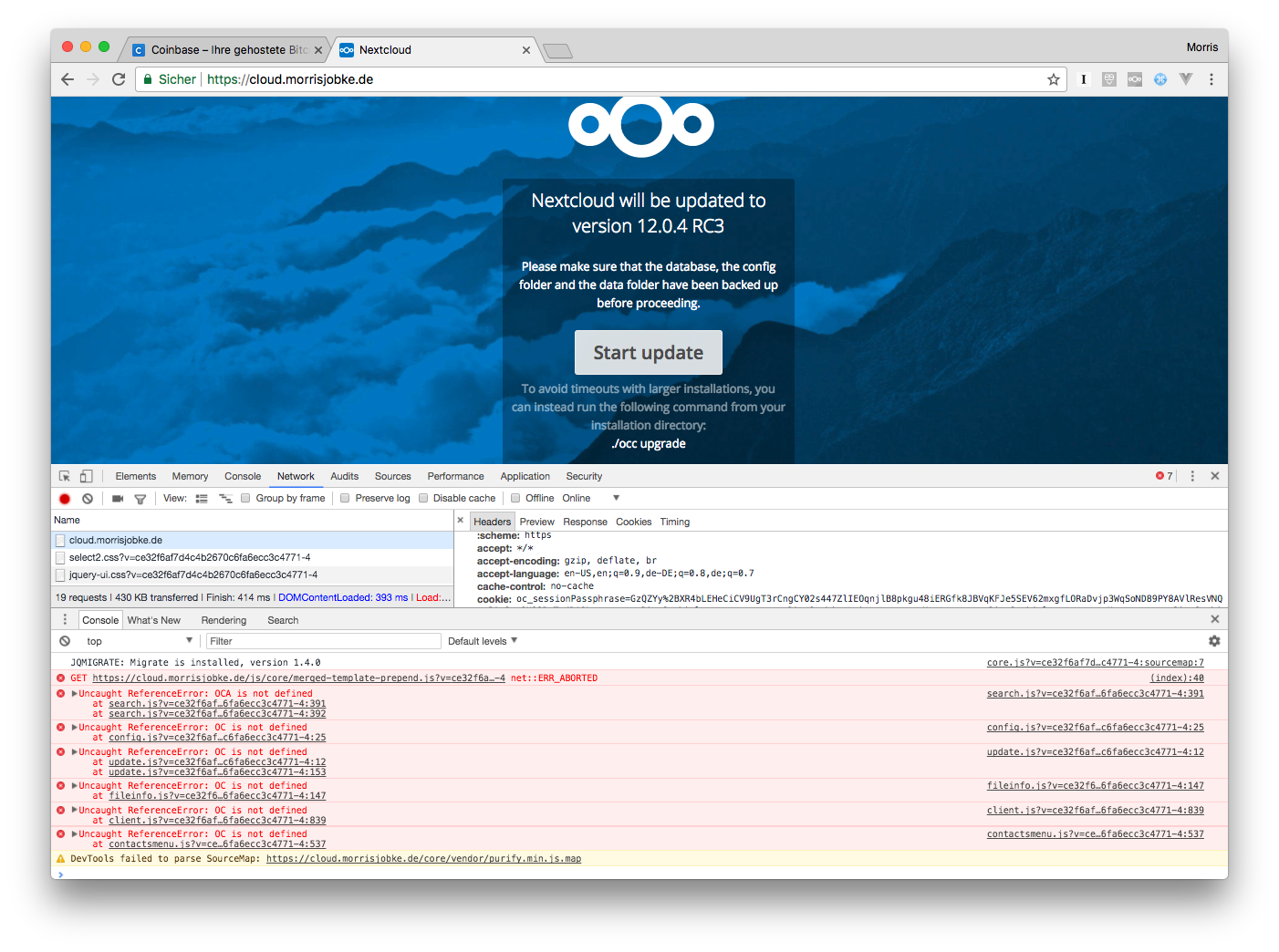
I reproduced this on two instances.
Ideas @blizzz @nickvergessen @rullzer @ChristophWurst @skjnldsv ?
RC3 can be found at: https://download.nextcloud.com/server/prereleases/nextcloud-12.0.4RC3.zip
Activity
blizzz commentedon Nov 28, 2017
is there more in the console log? network log?
blizzz commentedon Nov 28, 2017
console output looks a bit similar to what is reported in #7145
blizzz commentedon Nov 28, 2017
also it appears that getting merge-template-prepend.js was aborted, but from the browser?
danxuliu commentedon Nov 30, 2017
I can not reproduce it :-( I have used the following steps:
As far as I know OC and OCA "namespaces" are defined in merged-template-prepend.js, so if that file failed to load the other errors are expected. Moreover, the click handler for the Start update button is set in core/js/update.js, so if OC is not defined the execution of the file would fail when defining OC.Update, due to which the $(document).ready handler would not be set, and thus clicking on the button would do nothing.
What I have no idea is why merged-template-prepend.js failed to load :-S The net::ERR_ABORTED indeed seems to point to something in the browser.
I tried to configure Apache to send just merged-template-prepend.js really slow to check if it could be caused by clicking on the button before the script was loaded. However, after struggling with that for too long I gave up and assumed that I am too dumb to get Apache to behave like that :-P
Anyway, if I am not mistaken, even if merged-template-prepend.js took very long to load it would not be possible to click on the button before it finished, as the scripts are loaded synchronously and they block the rendering of the DOM until they are processed. So... I am clueless, sorry :-(
MorrisJobke commentedon Nov 30, 2017
I used Chrome and Safari and also two different instances :/
I still think, that we should not load the generated stuff on the update page and have only a very limited set of JS code available there to not mess with it (maybe served from inline script tags - we do the same for the web based updater to not cause too much trouble if a file gets not loaded and lock yourself out).
MorrisJobke commentedon Nov 30, 2017
I also tried to reproduce this again and the issue didn't happen afterwards anymore :/ I tried to reupgrade both instances, but then all went fine and the upgrade was possible.
Closing this as a false flag and some network hiccup. 😢
MorrisJobke commentedon Nov 30, 2017
While debugging through this I cleaned up a bit the upgrade check handling: #7354