Repository navigation
Cordova not available when using livereload on CLI 3.19.1 on Android Emulator #2973
Description

cli packages: (/usr/local/lib/node_modules)
@ionic/cli-utils  : 1.19.1
ionic (Ionic CLI) : 3.19.1
global packages:
cordova (Cordova CLI) : 8.0.0
local packages:
@ionic/app-scripts : 3.1.8
Cordova Platforms  : android 7.0.0 ios 4.5.4
Ionic Framework    : ionic-angular 3.9.2
System:
Node  : v9.4.0
npm   : 5.6.0
OS    : macOS High Sierra
Xcode : Xcode 9.2 Build version 9C40b
Environment Variables:
ANDROID_HOME : Users/prasanthvenugopal/Library/Android/sdk
Misc:
backend: pro
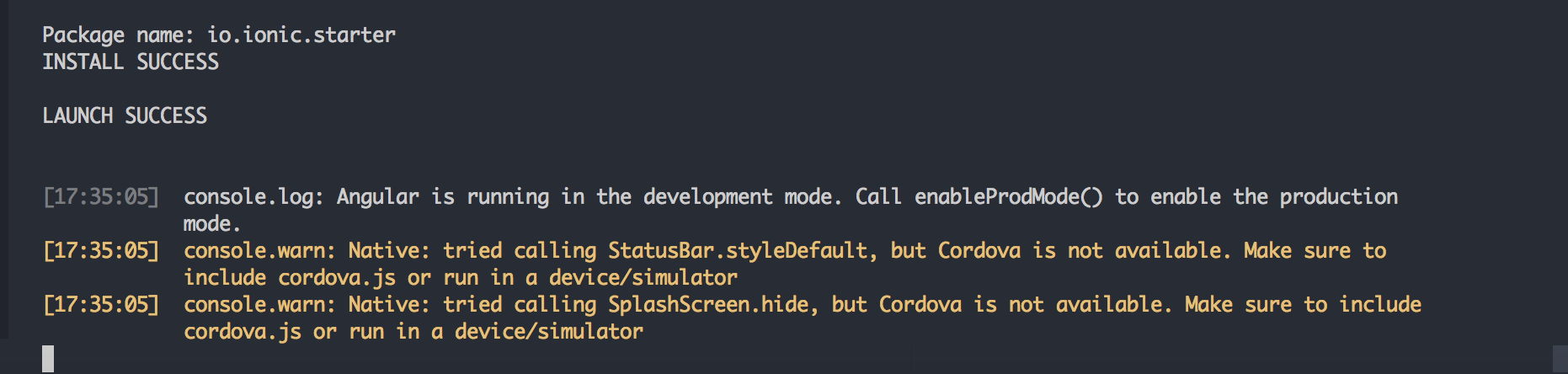
Cordova not available in android emulator while live-reload turned ON. Cordova detected when running without live-reload.
But in case of IOS, it works perfectly fine with live-reload.
Activity
stanlleyramalho commentedon Feb 16, 2018
Replace in node_modules/@ionic/app-scripts/dist/dev-server/serve-config.js:
exports.ANDROID_PLATFORM_PATH = path.join('platforms', 'android', 'assets', 'www');
to
exports.ANDROID_PLATFORM_PATH = path.join('platforms', 'android', 'app', 'src', 'main', 'assets', 'www');
imhoffd commentedon Feb 21, 2018
Thanks for posting the issue! This is actually a duplicate issue of ionic-team/ionic-app-scripts#1380
prasanthnv commentedon Feb 28, 2018
I downgraded android platform version to 6+ and it works fine.
stenioanibal commentedon Apr 11, 2018
Hello! Before days ago i had this problem and, most solutions not works for me, including @stanlleyramalho solution. After tests and searchs, i finded another similar solution and this works for me!
Edit file node_modules/@ionic/app-scripts/dist/dev-server/serve-config.js and change last line to:
In bad case, run
ionic cordova platform remove androidand add again.I expect this works for you!