Repository navigation
How to send message to QGC or other UAVs? #812
Description

Hi, Everyone,
I have been using dronekit-python happily, but recently there is a need to send mavlink messages from my dronekit to QGC or UAVs other than the one that is connected with my dronekit. For example, two UAVs and QGC are connected as follows:
Dronekit<==>UAV1 <--- mavlink ----> UAV2 <--- mavlink ---> QGC
Could someone tell me how to send a message from Dronekit to UAV2 or GGC? I have been trying to modify the code of dronekit-python to do this but without any success. Any help would be greatly appreciated. Thanks!
Activity
pietrodn commentedon Apr 1, 2018
I managed to forward the MAVLink messages coming from an UAV connected to a serial port through DroneKit to QGroundControl.
UAV (PX4) <==== (serial) ====> DroneKit <==== (MAVLink UDP stream) ====> QGroundControl
The code to do so is already present in DroneKit. Look into the
mavlink.pyfile for themavudpin_multiclass and for theMAVConnection.pipe()method.The code I used is:
This code starts a listener on UDP port 15667 which automatically establishes the necessary connections with clients. All MAVLink messages coming from the vehicle are forwarded on the UDP clients, and all the messages coming from the UDP clients are forwarded to the client.
To make the forwarding work I had to alter the source component ID.
Then I configured QGroundControl to contact the host running DroneKit via UDP on port 15667. QGroundControl itself should listen on another port.
Here's an example configuration:
weiminshen99 commentedon Apr 2, 2018
@pietrodn ,
Thanks for your nice and quick post! I immediately tried it but not yet get it working. Here is what I did to send PING messages from my dronekit to QGC:
On QGC, I connected, as you shown, 127.0.0.1:15667. I was hoping to see the PING messages at QGC, but they did not show up. Also, I tried the same thing to PING another UAV with target_system=2, and no luck.
Could you please let me know what I did not do right? In addition, could you please post your minimal but complete code so that we can try exactly what you did? For example, what messages did you send? What are the results you see at QGC? Other small differences include: you used 'udpin:0.0.0.0:15667', I used 'udpin:127.0.0.1:15667'. Yours is connect('/dev/ttyS0'), mine connect('127.0.0.1:14540') for a PX4 SITL. I don't know if these make any differences. Have you tried it on a PX4 SITL? Thanks for your help!
pietrodn commentedon Apr 2, 2018
I tried exclusively on the PX4 firmware.
For the “udpin” connection string, the IP tells on which interfaces DroneKit should be listening for incoming connections. 0.0.0.0 means “all interfaces”, so I recommend using that until you get the forwarding to work.
Also, check if you have a firewall blocking some ports.
I didn’t need to manually send any message: I clicked on “connect” on QGC and the software displayed me the full status of the drone (battery, sensors, parameters, etc.)
Are QGC and PX4 running on the same host?
pietrodn commentedon Apr 2, 2018
And yes, I tried both on a real UAV and on a PX4 SITL. On the SITL, however, I had to disable the automatic listening on UDP port 14540 on QGC, otherwise QGC will try to connect directly to the SITL and not to the forwarded connection.
pietrodn commentedon Apr 2, 2018
Oh, and don’t use 14540 or 14550 as a listening port on QGC... use something random, not related to the SITL. Otherwise it will complain that the port is already bound by another application.
weiminshen99 commentedon Apr 2, 2018
Thanks for your detailed replies! I am almost there but have one more question. I have my QGC connected to 15667 first, but when I started my dronekit after that, dronekit complains that 15667 is already in use. But if I first connect dronekit on 15667, then QGC will complain that 15667 is already in use when I clink connect there. What did I miss?
pietrodn commentedon Apr 2, 2018
Probably you set 15667 as the "listening port" in QGC. Try to use another port. Otherwise, there is another process running...
weiminshen99 commentedon Apr 2, 2018
It is working now! Thank you so much and I am excited.
You are right that I set 15667 as the listening port, instead of the target_host in QGC.
Next, I will try your approach for UAV1<=>(dronekit) <---UDP---> (dronekit)<=>UAV2
and will report how it goes.
By the way, on another matter, how did you insert your code so nicely in your posted messages? I need to improve mine.
weiminshen99 commentedon Apr 3, 2018
Hi, Again @pietrodn,
I am now trying to PING from UAV#2 to QGC using the following code with a listener on all PING msgs:
self.msg1 = self.vehicle.message_factory.ping_encode(4567, 1, 255, 1)
print "Before Sending: {src=%s, %s}" % (self.msg1.get_srcSystem(), self.msg1)
self.vehicle.send_mavlink(self.msg1)
print "After Sending: {src=%s, %s}" % (self.msg1.get_srcSystem(), self.msg1)
The results are:
Before Sending: {src=0, PING {time_usec : 4567, seq : 1, target_system : 255, target_component : 1}}
After Sending: {src=255, PING {time_usec : 4567, seq : 1, target_system : 2, target_component : 1}}
Listen: [src=2, PING {time_usec : 4567, seq : 1, target_system : 2, target_component : 1}]
Notice that the target_system in the PING message has been automatically changed from 255 to 2 by the function fix_targets() in mavlink.py
dronekit-python/dronekit/mavlink.py
Line 274 in 9f6572a
Do you know how to go around this so that UAV#2 can ping anyone it wants (other than itself)?
pietrodn commentedon Apr 3, 2018
For the formatting thing, GitHub supports a simple markup language called “GitHub flavored Markdown”. Google it :-)
To avoid the fix_targets correction, I’m afraid you’ll have to monkey-patch the MAVConnection class:
Where your new method may as well be a no-op.
Or, if you always want the same target to be set, you can set the udp_conn.target_system attribute so that fix_target will write what you want.
weiminshen99 commentedon Apr 3, 2018
Great suggestions and it is working! The code that modifies udp_conn.fix_targets and uses udp_conn.master.mav.send to send messages are here:
The results: you can hear QGC saying "Hello" and see the PING messages in QGC's Mavlink Inspector.
The only thing strange about this is that the ID 255 does not seem to be relevant. You can change it to any ID and QGC still receives the PING message. Is that normal?
pietrodn commentedon Apr 3, 2018
Does QGC also reply to the ping when the ID is incorrect?
weiminshen99 commentedon Apr 3, 2018
QGC does not seem to reply to any ping messages no matter if the ID is correct or not. My vehicle is "listening" to PING messages as follows, so if there is a reply PING, it should be heard:
self.vehicle.add_message_listener('PING', listen_msg_src)
Maybe the current QGC has not implemented the PING protocol yet. (I know PX4 does not).
pietrodn commentedon Apr 3, 2018
Here I see a long-ish discussion on QGC's PING implementation. Didn't read it all but maybe it could be of interest. Good luck! :-)
weiminshen99 commentedon Apr 4, 2018
Hi, @pietrodn ,
Sorry to bother you for another dumb question. For the following two configurations, CONFIG#A works, but I don't know how to make Config#B work.
CONFIG#A: PX4#1<=>#1(15667) <=== (MAVLink UDP stream) ===> QGC
CONFIG#B: PX4#1<=>#1(15667) <=== (MAVLink UDP stream) ===> #2<=>PX4#2
In CONFIG#A, as you suggested, I could target QGC to the udp port (15667) opened by #1. But in CONFIG#B, I don't know how to make #2 connect to 15667. I tried connect('127.0.0.1:15667', 921600, wait_ready=True) from #2, but it does not work.
Please help. Thanks so much!
35 remaining items
AfshinMr commentedon Nov 22, 2018
Thank you @hamishwillee for your comment. In my application, I am trying just to forward whatever I receive from the QGC to the vehicle and vise versa. So, When the QGC is receiving all the messages that it receives in the direct connection, why it should not recognize the vehicle?!
What do you mean that my system require to implement some minimal set of parameters? can you explain more? what do you suggest to do then?
AfshinMr commentedon Nov 22, 2018
@pietrodn , @hamishwillee I created a direct connection between the vehicle and QGC and investigated which messages are being transferred. Here it is:
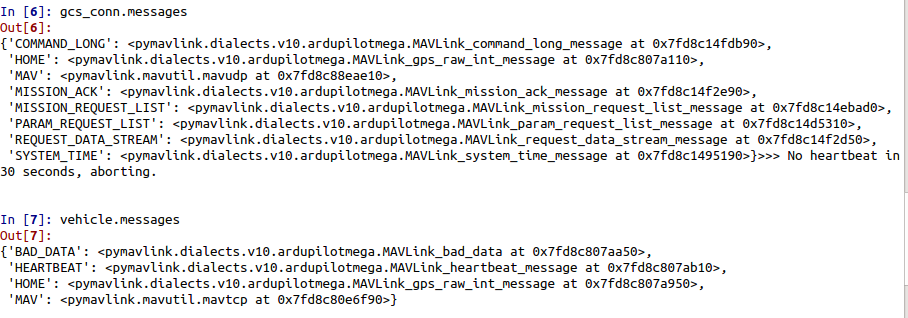
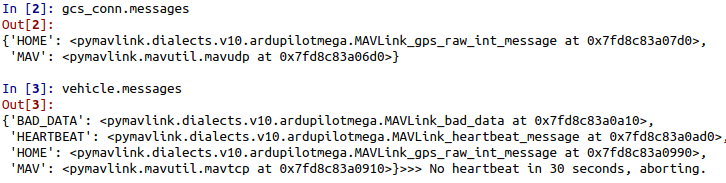
But when I put the proxy to receive and send the messages, these are the transferred messages:
Therefore, QGC is not asking for some messages! and that's the reason that it does not recognize the vehicle !
What do you think? How can I deal with this?
pietrodn commentedon Nov 22, 2018
I see that you are communicating with QGC via TCP. Try UDP instead, and check that the port is open (Wireshark, netcat...)
hamishwillee commentedon Nov 22, 2018
Yes, @pietrodn advice is good - I don't think PX4 supports TCP connections. Certainly SITL does not.
AfshinMr commentedon Nov 23, 2018
@pietrodn @hamishwillee I replaced the communication between the proxy and QGC with UDP connection. I received the same messages as following (QGC still does not recognize the vehicle):
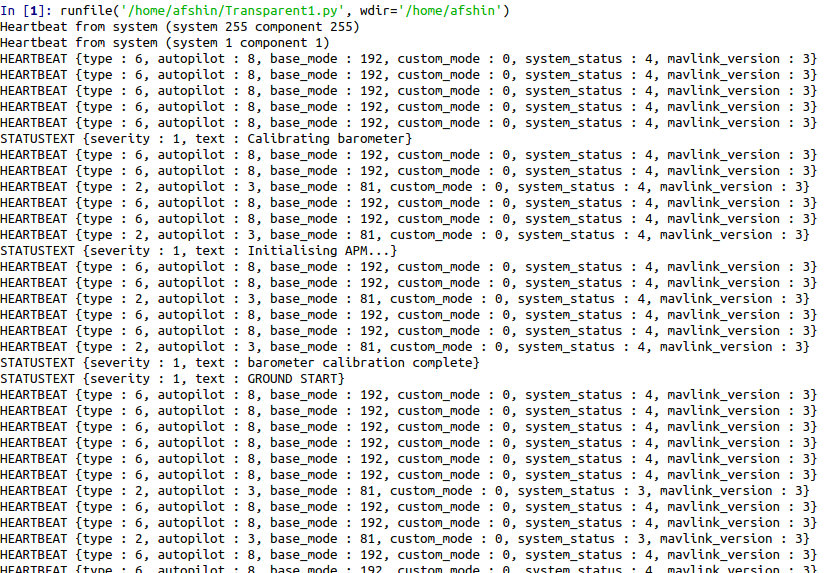

But, as I know, the UDP connection is not bidirectional ! so, I may need to create another connection for returning the messages from the proxy to the QGC ! what do you think?
this is the wireshark screen shot:
QGC is listening on port 14990 and initiate the connection on port 15667 of the proxy.
pietrodn commentedon Nov 23, 2018
UDP packets have a source (port, ip) tuple and a destination (port, ip) tuple. So it is possible to "answer" to an unicast UDP datagram (think about DNS, for example).
In this case the communication is bidirectional, as you can see. QGC is sending data on UDP port 15667.
AfshinMr commentedon Nov 24, 2018
@pietrodn I understood !
the problem here must be the lack of some messages in
gcs_conn.messages! any other advises? or idea?AfshinMr commentedon Nov 26, 2018
@pietrodn What about if I modify the
pipefunction (I mean here:vehicle._handler.pipe(connection)),leading not to forward messages directly ! I mean, instead of forwarding the messages, first modify them and then forwarding ! Is it possible?pietrodn commentedon Nov 15, 2021
Sorry but I don't work with drones anymore and forgot these details 😞
I think you can achieve it by changing the connection settings in the QGC UI.
hamishwillee commentedon Nov 15, 2021
@giamo152 That's odd, since QGC listens on 14550. If you're working on PX4 I strongly recommend moving to MAVSDK as it is properly supported: https://mavsdk.mavlink.io/main/en/index.html
hamishwillee commentedon Nov 16, 2021
@giamo152 In that case you should have created a separate issue rather than adding to this one. The answer to your question is "maybe".
But a better one is to use Wireshark: https://mavlink.io/en/guide/wireshark.html
housso97 commentedon Jul 18, 2022
@weiminshen99 it would be really nice if you could share your source code. I am trying to to have two drones working on the same mission and communicating with each other. One does the scan of a certain area and the other receives the data and when the point of interest is reached we send the gps coordinates.
your configuration might be interesting for my use case.
thanks in advance.