Repository navigation
Broadcast URI not set to vxlan, but vlan #3040
Description

ISSUE TYPE
- Bug Report
COMPONENT NAME
Management Server
CLOUDSTACK VERSION
master / 4.12
CONFIGURATION
Advanced Networking with KVM and VXLAN
OS / ENVIRONMENT
- Ubuntu 18.04
- KVM
SUMMARY
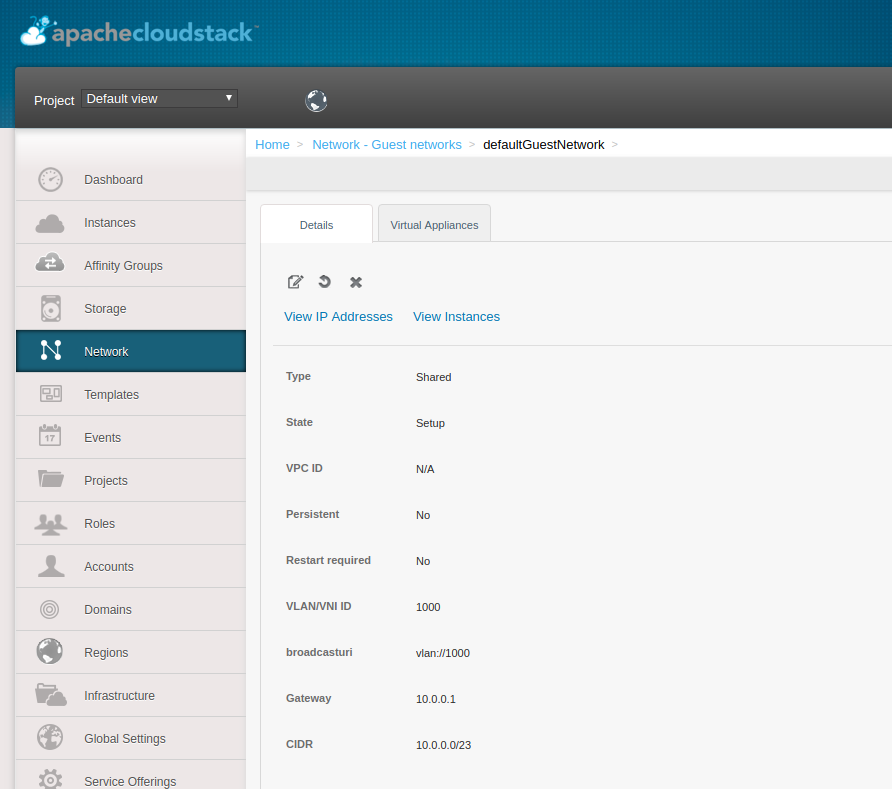
Advanced Network zone with VXLAN is created. When creating a guest network and setting the VNI this is set for the network:
- broadcast_uri: vlan://1000
- isolation_uri: vlan://1000
STEPS TO REPRODUCE
- Create a Advanced Zone with VXLAN
- Create a guest network
- See that broadcast is set to vlan and not vxlan
Activity
yadvr commentedon Nov 21, 2018
@wido I tested with 4.11.2.0 I could n't reproduce the issue, likely a configuration issue on your end. What did you configure for the guest network?
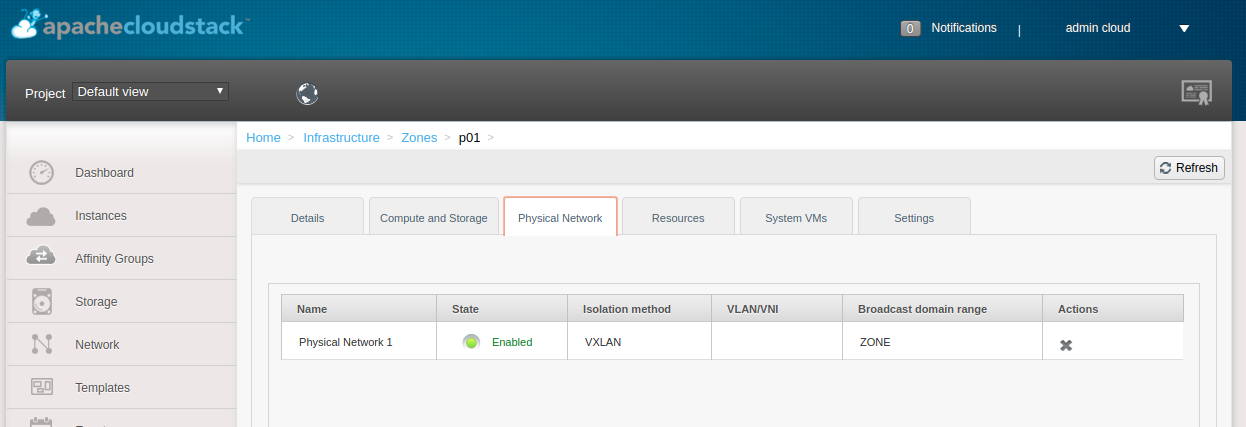
My config from UI:
wido commentedon Nov 21, 2018
@rhtyd The difference I see is that I did not set "VLAN/VNI Range(s)" under the Physical Network.
But it's still odd that if the zone is set to VXLAN that vlan:// isolation is used. That should default to VXLAN.
yadvr commentedon Nov 21, 2018
@wido when you created the shared network did you pass a custom just vid/vni but without the vxlan:// scheme? Try again to create a shared network passing vxlan://id. I think somewhere it must be assuming vlan:// by default when scheme is not passed.
wido commentedon Nov 21, 2018
When trying to set the VNI range I get this error:
Checking NetworkServiceImpl.java I see:
        if (vnetRange != null) {
            // Verify zone type
            if (zoneType == NetworkType.Basic || (zoneType == NetworkType.Advanced && zone.isSecurityGroupEnabled())) {
                throw new InvalidParameterValueException("Can't add vnet range to the physical network in the zone that supports " + zoneType
                        + " network, Security Group enabled: " + zone.isSecurityGroupEnabled());
            }
        }
Why wouldn't this be supported with Security Grouping enabled?
wido commentedon Nov 21, 2018
I just supplied the VNI number without a scheme.
Although I understand you reasoning, if the zone is set to VXLAN, we should default to that?
yadvr commentedon Nov 21, 2018
@wido looks like you hit a presentational bug. I see you are using adv zone with SG, so I'm not sure if you need vxlan/vlan at all or how should such a deployment work unless you've made the default public/private bridge device to carry traffic over a vlan enabled nic. With SG enabled, you already got L3 isolation with host level firewall (ebtables), why would you need vxlans?
wido commentedon Nov 21, 2018
On our public cloud every VM gets public IPs. The reason we want to use VXLAN is the flexibility it provides on a network level to separate our network using Layer 3.
Layer 2 VLANs are not robust and flexible enough to route on large scale.
The 'Guest Networks' are shared. Multiple different customers can have a Virtual Machine in that network.
For this example I used real-life IPs which we are using now in a PoC.
Security Grouping is needed to prevent IP-spoofing, but also provide firewalling for Virtual Machines.
'Guest Network 4' is dedicated to a account. This way the customer knows that all VMs he/she deploys will be in that network and on for example his office connection he/she can safely allow that specific subnet in the firewall.
yadvr commentedon Nov 22, 2018
@wido the current network model is not designed and implemented that way wrt KVM. The vlan/vxlan based isolation is for isolated/vpc networks implemented by the VR which does NAT-ing from public network end; and typically a bridge device is created where guest domain/VM's nic (via tap devices) are plugged and any vxlan tunnel end point (vtep) or vlan enable ethernet device is plugged to implement the (isolated/vpc-tier) network. With SG you get massive-scalable L3 isolation by having host-level firewall implemented/enforced by ebtables (firewall rules on bridge) rules and ipset config, and so there is no need of a VR to do network isolation (however VR does only provide dhcp and dns).
What you've described is a new feature where you want the guest VMs to still receive public IPs and network access, but the (public) bridge device to provide isolation by plugging in a vxlan (or vlan) enabled ethernet device and carry public traffic over vxlan for a tenant. This means on your core router side, for all such guest networks isolation should terminate (vxlan). If there is no need of isolated network and guest networks are still shared, so the question is -- do you only want isolation between these shared networks which carry public traffic only in your datacenter? You already have L3/SGs isolation.
I've not tested but you can try adding public address ranges with SG enabled and some isolation (vlan:// or vxlan:// tagging), dedicate that range to an account and see if that works.
Lastly, L2/vlan isolation implementation and usage are quite robust, widely used in enterprise but not massively scalable.
yadvr commentedon Nov 22, 2018
@wido are you btw exploring something like https://www.exoscale.com/syslog/introducing-private-networks/ https://community.exoscale.com/documentation/compute/private-networks/ ?
svenvogel commentedon Nov 22, 2018
@wido can i ask what you plan do use kernel bridge or openvswitch?
wido commentedon Nov 22, 2018
@rhtyd Let me respectfully disagree with you there.
With VXLAN this works. I can create a Shared Network with Security Grouping where my Instance obtains a public IPv4/IPv6 address without the VR in the middle. Our own routers handle the gateway.
VLANs are fun, but L2 is not useful in large scale deployments. It creates many problems which are solved by VXLAN. For CloudStack there is also no difference between VXLAN and VLAN. It's just a slightly different way of creating the bridges on the KVM hypervisor.
@svenvogel At the moment we are looking into using Linux Kernel Bridges.
Openvswitch is something we might consider later.
7 remaining items
DaanHoogland commentedon Mar 10, 2020
@wido is this still an issue and is work on this underway? or can we close?
wido commentedon Mar 10, 2020
This issue is still relevant. At the moment there has been no work on this I think.
Fix issue apache#3040: Broadcast URI not set to vxlan, but vlan
Fix issue apache#3040: Broadcast URI not set to vxlan, but vlan
Fix issue apache#3040: Broadcast URI not set to vxlan, but vlan
Fix issue apache#3040: Broadcast URI not set to vxlan, but vlan
Fix issue apache#3040: Broadcast URI not set to vxlan, but vlan
Fix issue apache#3040: Broadcast URI not set to vxlan, but vlan
Fix issue apache#3040: Broadcast URI not set to vxlan, but vlan
server: Broadcast URI not set to vxlan, but vlan (Fix #3040) (#4190)