You signed in with another tab or window. Reload to refresh your session.You signed out in another tab or window. Reload to refresh your session.You switched accounts on another tab or window. Reload to refresh your session.Dismiss alert
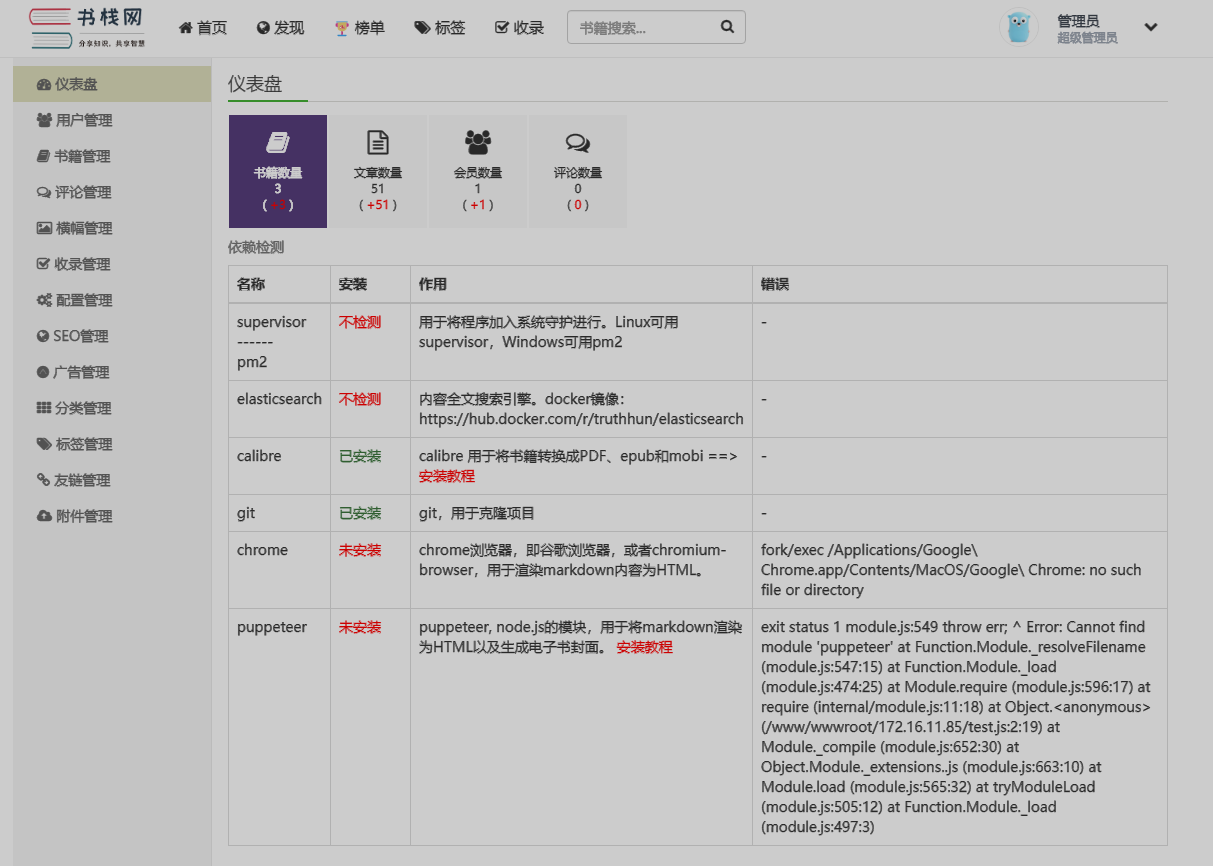
exit status 1 module.js:549 throw err; ^ Error: Cannot find module 'puppeteer' at Function.Module._resolveFilename (module.js:547:15) at Function.Module._load (module.js:474:25) at Module.require (module.js:596:17) at require (internal/module.js:11:18) at Object. (/www/wwwroot/172.16.11.85/test.js:2:19) at Module._compile (module.js:652:30) at Object.Module._extensions..js (module.js:663:10) at Module.load (module.js:565:32) at tryModuleLoad (module.js:505:12) at Function.Module._load (module.js:497:3)
请按照一下格式提交issue,谢谢!
你当前使用的是哪个版本的 BookStack?
[v2.10]
你当前使用的是什么操作系统?
Ubuntu 18.04
你是如何操作的?
安装chrome、puppeteer 出错,后跳过该步骤直接下一步安装bookstack,可以进系统,后台出现错误,
`
安装成功
5. 当前遇到的是什么结果?