You signed in with another tab or window. Reload to refresh your session.You signed out in another tab or window. Reload to refresh your session.You switched accounts on another tab or window. Reload to refresh your session.Dismiss alert
{{ message }}
This repository was archived by the owner on Oct 6, 2026. It is now read-only.
Repository navigation
This repository was archived by the owner on Oct 6, 2026. It is now read-only.
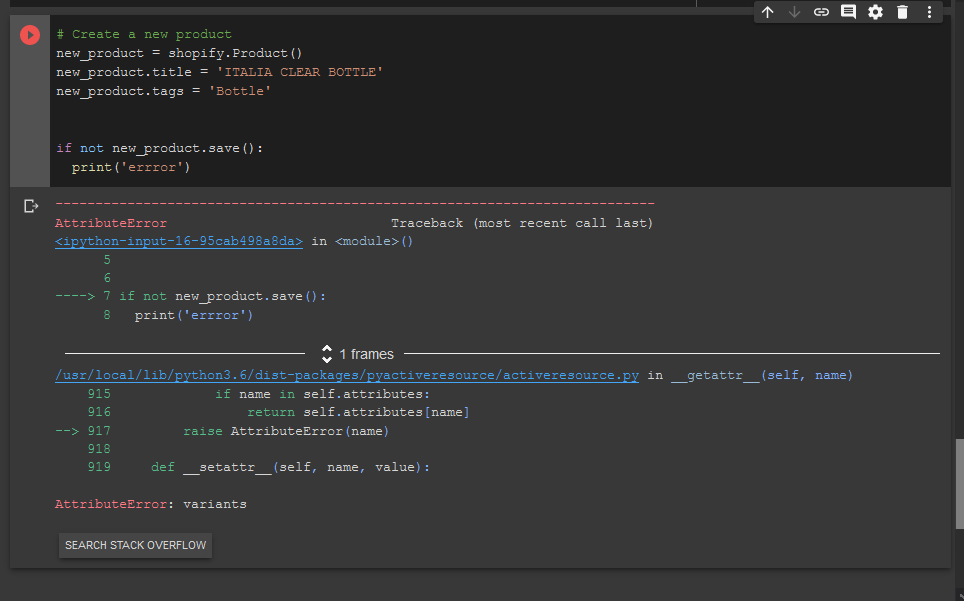
Creating a product does not work as documented, need to set variant field #386
There is a check in the Product save function for API versions >= 201910 it attempts to read the variant attribute, however it has not been set to any value as it is not a required field as per the API specification.
Traceback (most recent call last):
  File "/Users/johan.land/PycharmProjects/FarmFoods/bin/tmp.py", line 15, in <module>
    shopifyProduct.save()
  File "/Users/johan.land/PycharmProjects/FarmFoods/venv/lib/python3.8/site-packages/shopify/resources/product.py", line 39, in save
    if 'variants' in self.product.attributes:
  File "/Users/johan.land/PycharmProjects/FarmFoods/venv/lib/python3.8/site-packages/pyactiveresource/activeresource.py", line 917, in __getattr__
    raise AttributeError(name)
AttributeError: product
I believe @prysie is right about where the issue is, but it seems that the loading of product does not set the variants correctly. As such, the behavior is not as one would expect (e.g. loading and then saving a product should not throw an error). Please note that @poolebu 's fix of adding setting the variants (.variants=[]) does not resolve the issue in my case.
EDIT:
Attaching the code for the save() method in my system just to verify that it has the updated if-statement:
    def save(self):
        start_api_version = '201910'
        api_version = ShopifyResource.version
        if api_version and (
                api_version.strip('-') >= start_api_version) and api_version != 'unstable':
            if 'variants' in self.product.attributes:
                for variant in self.variants:
                    if 'inventory_quantity' in variant.attributes:
                        del variant.attributes['inventory_quantity']
                    if 'old_inventory_quantity' in variant.attributes:
                        del variant.attributes['old_inventory_quantity']
        return super(ShopifyResource, self).save()
EDIT2:
This will almost certainly be frowned upon, but I need my system to stay in production so I just need to do a workaround, especially seeing that this issue has been open for two months with no movement. For me, reverting back to 2019-10 was not an option (due to Write requests to inventory_quantity and inventory_quantity_adjustment are no longer supported, so I needed to create a workaround.
I think the issue is the self.product.attributes. This is already a Product class and as such it should just be self.attributes. That is, change the method to:
    def save(self):
        start_api_version = '201910'
        api_version = ShopifyResource.version
        if api_version and (
                api_version.strip('-') >= start_api_version) and api_version != 'unstable':
            if 'variants' in self.attributes:
                for variant in self.variants:
                    if 'inventory_quantity' in variant.attributes:
                        del variant.attributes['inventory_quantity']
                    if 'old_inventory_quantity' in variant.attributes:
                        del variant.attributes['old_inventory_quantity']
        return super(ShopifyResource, self).save()
EDIT3:
Well, it created some other issues. So, instead, I tried to make 2019-10 to work:
2019-10 with 8.0.1 throws the error Write requests to inventory_quantity and inventory_quantity_adjustment are no longer supported
Reverted back 2019-10 with 7.0.3 and it throws the same error
Reverted back 2019-10 with 6.0.1 throw the same error as well
Reverted back 2019-10 with 5.1.2 and then pagination is not supported, but 2019-10 is the first version that actually requires pagination (and reverting back to 2019-07 is not an option)
So, I instead went the other direction:
Tried 2020-01 with 6.0.1 (first version with pagination) which throws the error "Write requests to inventory_quantity and inventory_quantity_adjustment"
Tried 2020-04 with 6.0.1 and the same error is thrown
Tried 2020-07 with 6.0.1 and the same error is thrown
Tried 2020-07 with 7.0.3 and the pagination works as well as write request. Seems we need at least 7.03. But, loading a product and then saving it does not work (see above)
Tried 2020-01 with 7.0.3 and loading a product and then saving it does not work
Tried 2020-04 with 7.0.3 and loading a product and then saving it does not work
So, effectively, there is not a version of the python library and the shopify api that solves all three problems (pagination, write requests and loading of products). Hence, rollback is not an option.
Either, I need to do 2020-07 with 8.0.1 without loading of products and then saving (e.g. updating product data/info/pricing), or I need to revert back to 2019-10 and somehow fix the write requests error.
EDIT4:
Alright, now I have it working in productions. But, I had to rollback all the way back to 2019-04 with 5.1.2, and I had to move all code back to .find() with page=X instead of the newer .next_page(). Also, do note that this is not an option for many people as using 2019-04 requires you to have old credentials. New credentials will not allow usage of 2019-04 and the all pagination methodology.
Please, can someone look into what the underlying issue is here? My early examples with 2020-07 and 8.0.1 are pretty clean errors and easy to reproduce.
Thanks!
EDIT5:
Proactively giving some more information to anyone trying to recreate the issue:
A. Is the product actually loading properly?
Yes:
True
41
Traceback (most recent call last):
  File "/Users/johan.land/PycharmProjects/FarmFoods/bin/tmp.py", line 17, in <module>
    shopifyProduct.save()
  File "/Users/johan.land/PycharmProjects/FarmFoods/venv/lib/python3.8/site-packages/shopify/resources/product.py", line 39, in save
    if 'variants' in self.product.attributes:
  File "/Users/johan.land/PycharmProjects/FarmFoods/venv/lib/python3.8/site-packages/pyactiveresource/activeresource.py", line 917, in __getattr__
    raise AttributeError(name)
AttributeError: product
B. Is the product you are testing with corrupt in any way? Is it happening to all products?
I tested it with two other products. Same error happened with both.
C. Can you create new products at all?
No, it seems to be broken also for new products. The following code:
product = shopify.Product()
product.title = "Shopify Logo T-Shirt"
print(product.id)
product.save()
Generated this output:
None
Traceback (most recent call last):
  File "/Users/johan.land/PycharmProjects/FarmFoods/bin/tmp.py", line 23, in <module>
    product.save()
  File "/Users/johan.land/PycharmProjects/FarmFoods/venv/lib/python3.8/site-packages/shopify/resources/product.py", line 39, in save
    if 'variants' in self.product.attributes:
  File "/Users/johan.land/PycharmProjects/FarmFoods/venv/lib/python3.8/site-packages/pyactiveresource/activeresource.py", line 917, in __getattr__
    raise AttributeError(name)
AttributeError: product
D. It seems something is wrong with your python set up. The example you just did above is a direct copy of an example here from this repo. Can you explain how you've set it all up?
Here's a full dump from a session with a completely fresh install:
LNLTMAC04VL416:test root# cat Dockerfile
FROM python:3.8.5
RUN pip install ShopifyAPI
ADD main.py /

LNLTMAC04VL416:test root# cat main.py
import shopify
import ssl

ssl._create_default_https_context = ssl._create_unverified_context

keys = {
    "API_KEY": "XXX",
    "PASSWORD": "XXX"
}

shop_url = "https://%s:%s@XXX.myshopify.com/admin/api/2020-07" % (keys["API_KEY"], keys["PASSWORD"])
shopify.ShopifyResource.set_site(shop_url)

product = shopify.Product()
product.title = "Shopify Logo T-Shirt"
print(product.id)
product.save()
LNLTMAC04VL416:test root# docker build -t testimage .; docker run -it testimage python3 main.py
Sending build context to Docker daemon   5.12kB
Step 1/3 : FROM python:3.8.5
 ---> 3189819ced3e
Step 2/3 : RUN pip install ShopifyAPI
 ---> Using cache
 ---> d749074a8275
Step 3/3 : ADD main.py /
 ---> Using cache
 ---> 8cc67245dcae
Successfully built 8cc67245dcae
Successfully tagged testimage:latest
None
Traceback (most recent call last):
  File "main.py", line 17, in <module>
    product.save()
  File "/usr/local/lib/python3.8/site-packages/shopify/resources/product.py", line 39, in save
    if 'variants' in self.product.attributes:
  File "/usr/local/lib/python3.8/site-packages/pyactiveresource/activeresource.py", line 917, in __getattr__
    raise AttributeError(name)
AttributeError: product
And, below is another session with the only change being the API version:
And this creates the product and saves it to Shopify (verified by the actual shopify UI). Not sure why it's giving the none towards the end. The example in the repo suggests the ID gets allocated before save.
Error:
File "/home/mbeasley32/germrip_shopify_api.py", line 15, in
product.save()
File "/home/mbeasley32/.local/lib/python3.8/site-packages/shopify/resources/product.py", line 39, in save
if 'variants' in self.product.attributes:
File "/home/mbeasley32/.local/lib/python3.8/site-packages/pyactiveresource/activeresource.py", line 917, in getattr
raise AttributeError(name)
AttributeError: product
Hello! @mbeasley32 is right! So I'm back working with the same code, and the issue is still here but in another form. The default stable package at the moment, 8.0.1 does not let me create a product as documented. See bellow
API_VERSION = '2020-07'
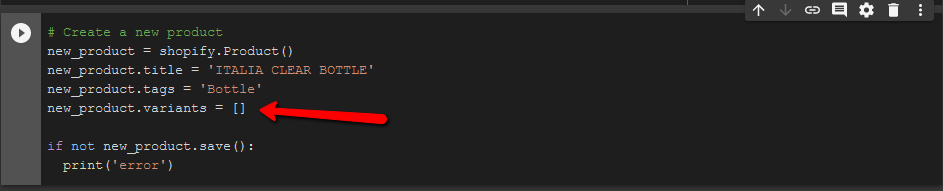
If I go back to version !pip install ShopifyAPI==8.0.0 and API_VERSION = '2020-04' I get the original error, which I can bypass by adding new_product.variants = [] before saving a new product.
It seems to me that you should test the documented code for creating a new product before releasing a new api version, since its a critical blocker use case, or maybe I'm doing something wrong?
I hope this report is useful, and thank you for the API
It looks like this is now working. At least the issue that previously caused my problems is resolved. I'll do the full upgrade now and see if I encounter any other bugs.
Thanks for fixing!
EDIT: Confirmed as fixed. No other issues encountered.

Activity
prysie commentedon Jun 30, 2020
There is a check in the Product save function for API versions >= 201910 it attempts to read the variant attribute, however it has not been set to any value as it is not a required field as per the API specification.
Looks like it is fixed in latest code base.
beetree commentedon Jul 28, 2020
I'm having a related issue using version 8.0.1. It can very easily be reproduced, and I've included full code below.
The following code...
... runs fine.
Whereas this code (only change is API version)...
... throws the following error:
I believe @prysie is right about where the issue is, but it seems that the loading of product does not set the variants correctly. As such, the behavior is not as one would expect (e.g. loading and then saving a product should not throw an error). Please note that @poolebu 's fix of adding setting the variants (
.variants=[]) does not resolve the issue in my case.EDIT:
Attaching the code for the save() method in my system just to verify that it has the updated if-statement:
EDIT2:
This will almost certainly be frowned upon, but I need my system to stay in production so I just need to do a workaround, especially seeing that this issue has been open for two months with no movement. For me, reverting back to 2019-10 was not an option (due to
Write requests to inventory_quantity and inventory_quantity_adjustment are no longer supported, so I needed to create a workaround.I think the issue is the
self.product.attributes. This is already a Product class and as such it should just beself.attributes. That is, change the method to:EDIT3:
Well, it created some other issues. So, instead, I tried to make 2019-10 to work:
Write requests to inventory_quantity and inventory_quantity_adjustment are no longer supportedSo, I instead went the other direction:
So, effectively, there is not a version of the python library and the shopify api that solves all three problems (pagination, write requests and loading of products). Hence, rollback is not an option.
Either, I need to do 2020-07 with 8.0.1 without loading of products and then saving (e.g. updating product data/info/pricing), or I need to revert back to 2019-10 and somehow fix the write requests error.
EDIT4:
Alright, now I have it working in productions. But, I had to rollback all the way back to 2019-04 with 5.1.2, and I had to move all code back to
.find()withpage=Xinstead of the newer.next_page(). Also, do note that this is not an option for many people as using 2019-04 requires you to have old credentials. New credentials will not allow usage of 2019-04 and the all pagination methodology.Please, can someone look into what the underlying issue is here? My early examples with 2020-07 and 8.0.1 are pretty clean errors and easy to reproduce.
Thanks!
EDIT5:
Proactively giving some more information to anyone trying to recreate the issue:
A. Is the product actually loading properly?
Yes:
Outputs:
B. Is the product you are testing with corrupt in any way? Is it happening to all products?
I tested it with two other products. Same error happened with both.
C. Can you create new products at all?
No, it seems to be broken also for new products. The following code:
Generated this output:
D. It seems something is wrong with your python set up. The example you just did above is a direct copy of an example here from this repo. Can you explain how you've set it all up?
Here's a full dump from a session with a completely fresh install:
And, below is another session with the only change being the API version:
And this creates the product and saves it to Shopify (verified by the actual shopify UI). Not sure why it's giving the
nonetowards the end. The example in the repo suggests the ID gets allocated before save.mbeasley32 commentedon Jul 29, 2020
I'm having this same issue. I cannot create or update a product with product.save() at all. It throws the same error @beetree mentions:
Code:
13: product = shopify.Product.find(5460519813285)
14: product.handle = "new handle"
15: product.save()
Error:
File "/home/mbeasley32/germrip_shopify_api.py", line 15, in
product.save()
File "/home/mbeasley32/.local/lib/python3.8/site-packages/shopify/resources/product.py", line 39, in save
if 'variants' in self.product.attributes:
File "/home/mbeasley32/.local/lib/python3.8/site-packages/pyactiveresource/activeresource.py", line 917, in getattr
raise AttributeError(name)
AttributeError: product
ernesto-butto commentedon Aug 1, 2020
Hello! @mbeasley32 is right! So I'm back working with the same code, and the issue is still here but in another form. The default stable package at the moment,
8.0.1does not let me create a product as documented. See bellowIf I go back to version
!pip install ShopifyAPI==8.0.0andAPI_VERSION = '2020-04'I get the original error, which I can bypass by addingnew_product.variants = []before saving a new product.It seems to me that you should test the documented code for creating a new product before releasing a new api version, since its a critical blocker use case, or maybe I'm doing something wrong?
I hope this report is useful, and thank you for the API
andyw8 commentedon Sep 22, 2020
Hi @beetree and @poolebu
Sorry to hear about these issues concerning problems with the library version and particular API versions.
We released v8.0.2 recently which should address this. Would you mind trying against the 2020-01 API (or later) that to see if it solves your issue?
We're also looking into ways to improve the release process to avoid similar issues in the future.
beetree commentedon Feb 13, 2021
It looks like this is now working. At least the issue that previously caused my problems is resolved. I'll do the full upgrade now and see if I encounter any other bugs.
Thanks for fixing!
EDIT: Confirmed as fixed. No other issues encountered.