You signed in with another tab or window. Reload to refresh your session.You signed out in another tab or window. Reload to refresh your session.You switched accounts on another tab or window. Reload to refresh your session.Dismiss alert
{{ message }}
Repository navigation
Batch importing/replacing instruments from resource pack #139
Some players prefer replacing all vanilla note block sounds with those in custom audio resourcepacks. While NBS already supports custom instruments, there are some inconveniences using this feature (especially when ALL sounds are to be replaced).
The first thing is similar to issue #74, as custom instruments are hard to tell apart when they look nearly all the same.
My suggestion is to allow "replacing" instruments rather than only adding, because when a resourcepack is used, all vanilla sounds become unused, but still occupying the block icons and colors. Clearly this can be achieved by manually replacing all the .ogg files in the Sounds folder, but it's just a little bit annoying to manage.
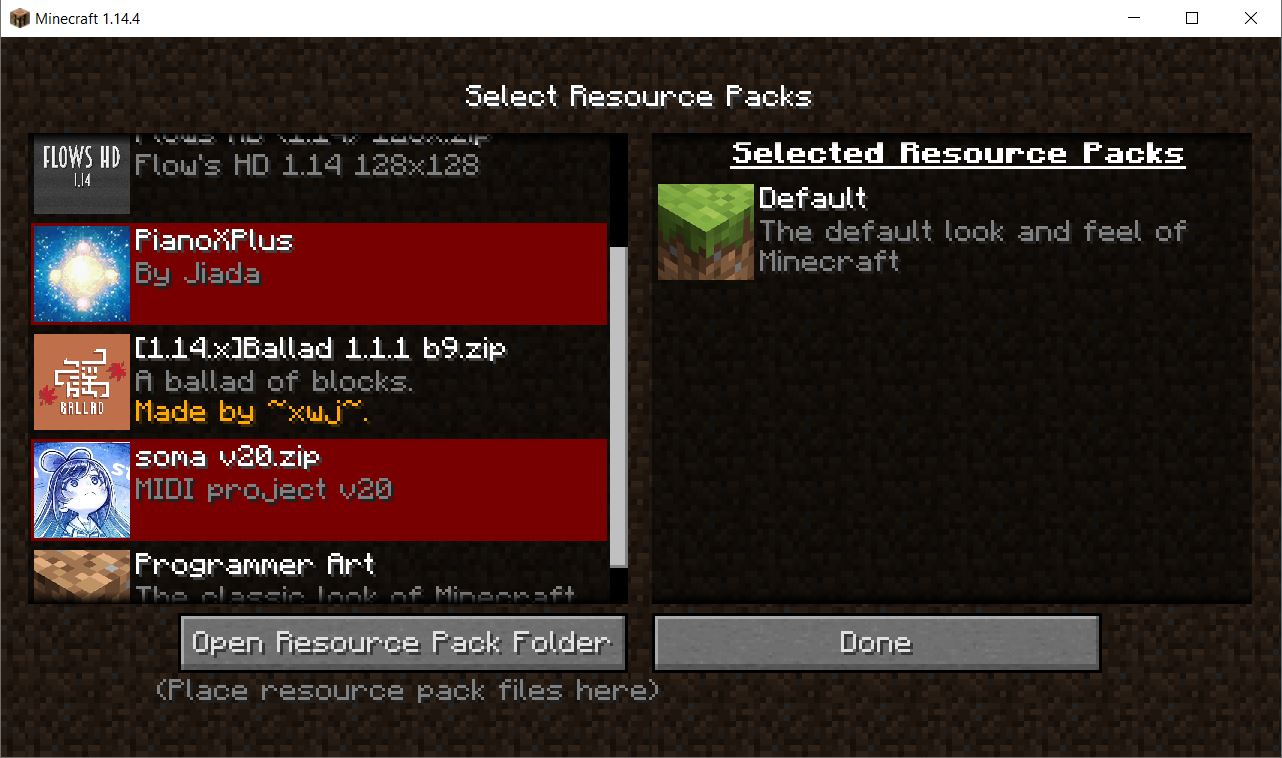
The second suggestion is also just for convenience. Is it possible to allow automatic batch importing instruments from an audio resourcepack instead of adding/replacing each of them manually?
Resourcepacks have a standard directory tree (and names and descriptions as identifiers), and for players they should be easier to manage as a whole than individual instruments.
To summarize, it would be great if the instrument management tab works just like in-game where you can replace it easily, if that's possible.
In a future version of the program, we plan to have instruments not be set by the available sounds in each Minecraft version, but by defining which of them you want to use in a particular song. The Sounds folder will just hold the possible sound effects you can load into the program, but in order to use them you have to create an instrument and assign a sound file to it. So if you want to make a song that only uses the piano (or none of the vanilla instruments, for that matter), it will only contain a single instrument, rather than all 15 vanilla instruments, as it is currently. It will also be possible to assign a single sound to more than one instrument, if you want different tracks to use different instruments.
As for the second suggestion, I assume you are looking for a way to open a resource pack with the program, and have it detect what sounds it contains so you can use them straight away? I don't see how that would be easier than dragging and dropping the sound files into the Sounds folder. Surely there could be a way to batch create instruments from multiple files at once, but I don't think it's necessary to read resource packs for that; after all, the primary goal of the program is to make it easier to transfer songs to Minecraft, not the other way around.
It's great to hear about your planned approach to solving the problem! That's really what I have hoped for. Looking forward to such a high degree of customization in the coming updates.
As for the second problem, please let me clarify a little bit based on my own situation. There are 2 things I'd like to do:
First, I'd like to switch out all 16 note block sounds and replace them with instruments in a custom resourcepack; and that's currently done and maintained by manually editing .ogg files in the Sounds folder. The problem with this is naming.
Take the "stone" sound for example.
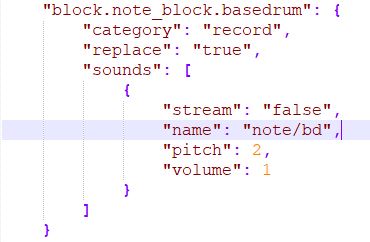
In Minecraft the sound is referred as "block.note_block.basedrum" in commands (or command blocks); in NBS Sounds folder it has to be named "bdrum" for NBS to detect it; in resourcepacks people prefer to use the name "bd" because that's what Mojang called it in earlier Minecraft versions. That's confusing.
To be clear, this is not your fault (more like Mojang's fault...), but it would be so much better if NBS takes this in to consideration when it comes to custom instruments. Maybe you can make use of the sounds.json file in resourcepacks, as shown in the picture above, to cope with naming issues - and that's why I suggest working with all sounds in a resourcepack as a whole.
The second problem makes things worse. I sometimes need to transpose my songs after finishing arrangement in NBS. To satisfy the 2-octave constraint, however, I have to edit the resourcepack, changing the pitch of the notes. I also need to swap out the Sounds folder, or I have to put up with either wrong pitch or wrong numbers when referring to NBS to build the song ingame. I have 12 versions of the same pack in 12 semitones of the base note, so it's a nightmare...
Maybe it's just me not finding a smart way so I run into these problems... or maybe someone else has similar problems, I'm not sure. But I would say, it can be a great improvement if the logic works similar to switching resourcepacks in-game. It's not about transferring songs from Minecraft to NBS; it's like "previewing" in NBS what a song would sound like in Minecraft with a given resourcepack.
changed the title [-][Quality-of-life Improvements] Batch importing/replacing instruments from resourcepack[/-][+]Batch importing/replacing instruments from resource pack[/+]on Jun 2, 2023
Activity
Bentroen commentedon Apr 1, 2020
In a future version of the program, we plan to have instruments not be set by the available sounds in each Minecraft version, but by defining which of them you want to use in a particular song. The
Soundsfolder will just hold the possible sound effects you can load into the program, but in order to use them you have to create an instrument and assign a sound file to it. So if you want to make a song that only uses the piano (or none of the vanilla instruments, for that matter), it will only contain a single instrument, rather than all 15 vanilla instruments, as it is currently. It will also be possible to assign a single sound to more than one instrument, if you want different tracks to use different instruments.As for the second suggestion, I assume you are looking for a way to open a resource pack with the program, and have it detect what sounds it contains so you can use them straight away? I don't see how that would be easier than dragging and dropping the sound files into the
Soundsfolder. Surely there could be a way to batch create instruments from multiple files at once, but I don't think it's necessary to read resource packs for that; after all, the primary goal of the program is to make it easier to transfer songs to Minecraft, not the other way around.DavidChen-cxl commentedon Apr 2, 2020
It's great to hear about your planned approach to solving the problem! That's really what I have hoped for. Looking forward to such a high degree of customization in the coming updates.
As for the second problem, please let me clarify a little bit based on my own situation. There are 2 things I'd like to do:
First, I'd like to switch out all 16 note block sounds and replace them with instruments in a custom resourcepack; and that's currently done and maintained by manually editing .ogg files in the
Soundsfolder. The problem with this is naming.Take the "stone" sound for example.
In Minecraft the sound is referred as "block.note_block.basedrum" in commands (or command blocks); in NBS
Soundsfolder it has to be named "bdrum" for NBS to detect it; in resourcepacks people prefer to use the name "bd" because that's what Mojang called it in earlier Minecraft versions. That's confusing.To be clear, this is not your fault (more like Mojang's fault...), but it would be so much better if NBS takes this in to consideration when it comes to custom instruments. Maybe you can make use of the
sounds.jsonfile in resourcepacks, as shown in the picture above, to cope with naming issues - and that's why I suggest working with all sounds in a resourcepack as a whole.The second problem makes things worse. I sometimes need to transpose my songs after finishing arrangement in NBS. To satisfy the 2-octave constraint, however, I have to edit the resourcepack, changing the pitch of the notes. I also need to swap out the
Soundsfolder, or I have to put up with either wrong pitch or wrong numbers when referring to NBS to build the song ingame. I have 12 versions of the same pack in 12 semitones of the base note, so it's a nightmare...Maybe it's just me not finding a smart way so I run into these problems... or maybe someone else has similar problems, I'm not sure. But I would say, it can be a great improvement if the logic works similar to switching resourcepacks in-game. It's not about transferring songs from Minecraft to NBS; it's like "previewing" in NBS what a song would sound like in Minecraft with a given resourcepack.
[-][Quality-of-life Improvements] Batch importing/replacing instruments from resourcepack[/-][+]Batch importing/replacing instruments from resource pack[/+]