Repository navigation
initial submission for categorization md and mindmap image - #156
Conversation





 lenucksi
left a comment
lenucksi
left a comment
There was a problem hiding this comment.
Thanks! This is great stuff.
I wonder if there is a library that is capable of rendering SVGs from the markdown using the command-line? (To auto-update & auto-generate the SVG upon commits using GitHub actions such that it can be used in PDFs and ePUBs)
The Atom library looks like and extension for the editor that will actually need a GUI and the editor. Or did I misinterpret that?

|
I found the tools that do diagram rendering from text that that I was looking for the other time:
Notable mention: |
@lenucksi Thanks a lot for find the markmap-lib! It can create a nice HTML with svg as part of it. I will update PR with the HTML created from the markmap-lib. |
|
@lenucksi Update md files with links to the patterns and create html for the mind map. The HTML can be used in website for mind map style pattern navigation. |
|
Here's the instruction on creating the html: |
|
We can also use Github Page to host HTML files and link to the IS.html for users to navigate to the patterns by challenges. |
|
@fwan2000 This sounds even better if it allows us to create something clickable additionally to something that is useful in "print" ;) |
lenucksi
left a comment
lenucksi
left a comment
There was a problem hiding this comment.
Tried this and it looks nice and works in my browser. SVG seems to be extractable for print.
|
@lenucksi Any other changes needed for this to be merged? |
I don't think so. Just a bit of time on my side, which currently is a bit sparse. Will probably get around to merging mid of the week. |
This is still great stuff, we just need to remember to add a GitHub Action to regenerate the SVG / HTML / rendered products once the .md changes and make a checklist item for PRs to update the .md once new things come in to keep everything fresh. |
 lenucksi
added
the
📖 Type - Content Work


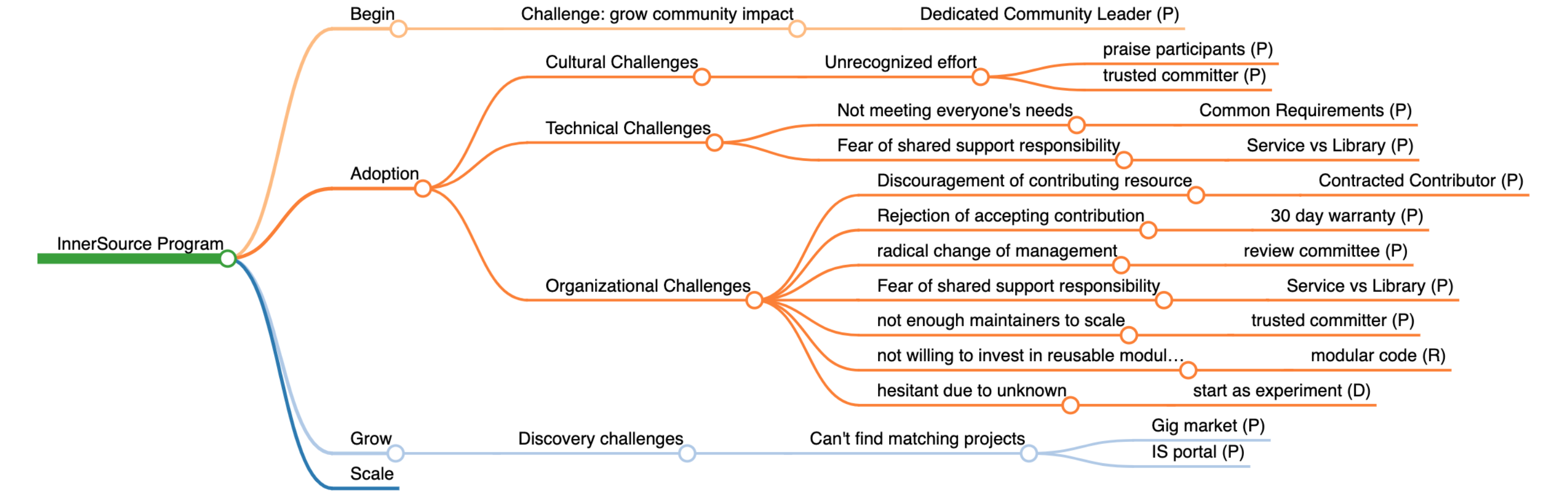
This is a categorization effort to use mind map to categorize proven patterns & some other lower maturity level patterns based on InnerSource program stage and challenges at the stage. Discussions are in issue #15 .
We use markdown file for mind map creation. Markdown file allows easy collaboration to make changes. svg file is created for the mind map visualization. It uses an Atom plugin: https://atom.io/packages/markdown-mindmap
The markdown file can also be used with an open source javascript library to visualize it on website: https://github.com/dundalek/markmap
Here's how the svg picture looks like: