You signed in with another tab or window. Reload to refresh your session.You signed out in another tab or window. Reload to refresh your session.You switched accounts on another tab or window. Reload to refresh your session.Dismiss alert
Regardless of what's causing it, messages should either decrypt or show error why they were not decrypted. Before you fix the cause of the issue, please fix the error reporting first.
I thought maybe it may have something to do with the migration / key storing fix in 0.7.3? You could try to set up on 0.7.2, then upgrade
For example, we could start using 0.7.2 as a "legacy". Then we would have one test that re-uses storage from 0.7.2, with 0.7.3 code, so that it's forced to use migrations as a part of the test.
Next time we have 0.8.5, it would again test it with the 0.7.2 storage, open a few messages, etc. Is that possible?
Next time we have 0.8.5, it would again test it with the 0.7.2 storage, open a few messages, etc. Is that possible?
Yes. But it's a bit complicated. Because I need to prepare all the important things before running a test. For example, I need to have all files from data/data/com.flowcrypt.email for 0.7.2. Then I should replace all files in data/data/com.flowcrypt.email of the current app version. Then I can run the test.
Is there a way to just run the 0.7.2 app manually one time, then export the storage into a file?
I can backup project files. But I think you a little don't understand how the current realization of tests works. Let me explain it. I create tests which are independent as more as possible. What does it mean? It means every test can be run any time as a unique instance. Every UI test is creating for some Activity to test its functionality. For example, I need to test Settings --> Keys.
Clear the app settings (ClearAppSettingsRule). I need to have a clear version of the app to be sure that the test before doesn't affect the current test.
Add an account. Because I can't test the current screen without an active account (AddAccountToDatabaseRule())
Add test private keys to the local database (AddPrivateKeyToDatabaseRule())
After that manipulation, I have a version of the app which looks like the installed app. Such realization helps me run any test independently.
So if I want to test the migration I need to replace files for every test. I don't say that it's impossible. It's just not easy and hard to maintain sometimes.
Actually, we don't need to replace files. We just need to prepare the right environment for a test. (as I've described for Settings --> Keys.)
I came here due to a google search,
I installed FlowCrypt Android v0.7.3 from the Google Play Store, I imported my private keys, and added my passphrases. The keys show up correctly in the Keys screen.
When opening any encrypted email sent to me, I am seeing:
Cannot decrypt this message due to an error:
MISSING_PASS_PHRASES
Exactly like in that screenshot above.
I never used 0.7.2 and I haven't upgraded from an earlier version.
The FlowCrypt Firefox browser extension works fine, with the same private keys and passphrases.
One key I created 3+ years ago, one key I created a couple of months ago, both using GnuPGP on Linux.
I imported them to FlowCrypt Android App by exporting from GnuPGP as ASCII-Armored text, copying them to my desktop clipboard, using a clipboard-sharing utility to copy the text to my Android phone clipboard, then using the Import from Clipboard option in the app.
The import process went smoothly, and the passphrase entered for the keys was correct.
Both keys (for two different mail accounts) show the same problem.
Please put your private key into FlowCrypt settings - additional settings - experimental - check compatibility. (on the browser plugin). Please copy what it prints out here, or send it to human@flowcrypt.com with link to this issue. Thanks!
@ashleysommer The key looks usual based on the export. Would you be able to create a test key for us that resembles the key you have? Then you'd share the test key and test pass phrase with us, and we'll use it to debug the app. I know it's a big ask but if you could do it, that would be of great help! Please let me know.
Ok, I generated a new secret key using latest GnuPG v2.2.4 from Ubuntu 18.04, and sent it to that email address.
I used exactly the same process and tried to get the key and subkeys as close as possible in configuration to my other two keys.
I imported it to the Android app and it is showing the same "MISSING_PASS_PHRASES" message when I attempt to decrypt a message.
Hello @ashleysommer. Thanks for reporting this. We've found you use ECC keys. Unfortunately, the current realization which uses J2V8 does not support ECC keys. This issue will be fixed when we will use Node.js for message decryption. I hope it'll be soon :)
@DenBond7
Thank you for looking into this.
I thought it might be something along those lines.
I'm looking forward to the new release, and I will continue to use FlowCrypt just through the firefox browser extension until then.
Hello @ashleysommer. I'm happy to notify you that we've already migrated to use Node.js for all PGP actions. I hope now you can use the Flowcrypt Android app with no issues.


Activity
tomholub commentedon Feb 27, 2019
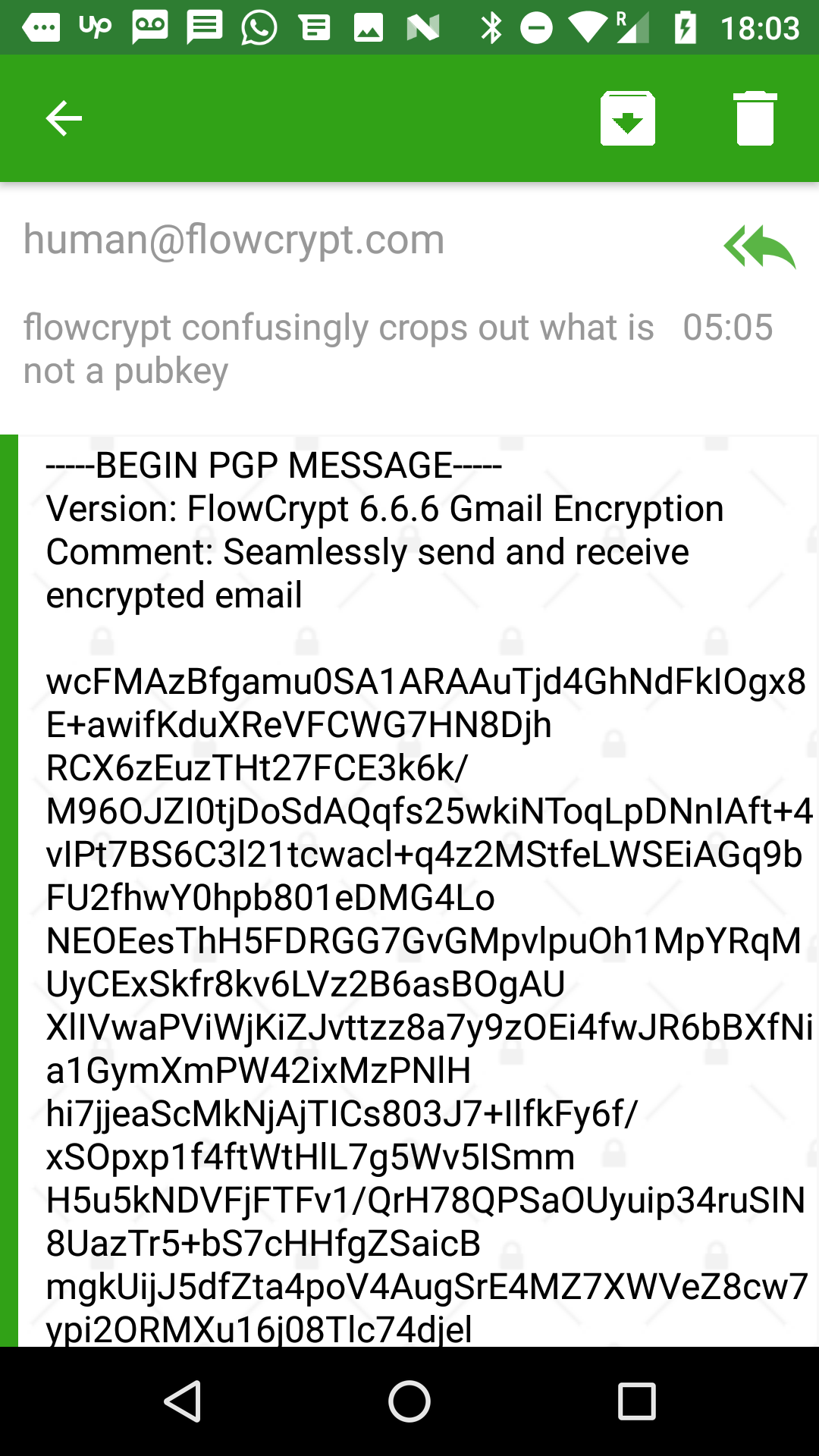
Same thing happened in "standard encrypted message from FlowCrypt Chrome extension".
Automated tests should be definitely catching things like this.
DenBond7 commentedon Feb 27, 2019
@tomholub It's strange because I can decrypt this message.
Could you show me Settings --> Keys? I want to know how to reproduce it.
tomholub commentedon Feb 27, 2019
Regardless of what's causing it, messages should either decrypt or show error why they were not decrypted. Before you fix the cause of the issue, please fix the error reporting first.
I thought maybe it may have something to do with the migration / key storing fix in 0.7.3? You could try to set up on 0.7.2, then upgrade
DenBond7 commentedon Feb 27, 2019
@tomholub
Yes, you are right. I've caught this error after those steps.
I've found the reason. It's an error in my code. I'm receiving the following error:
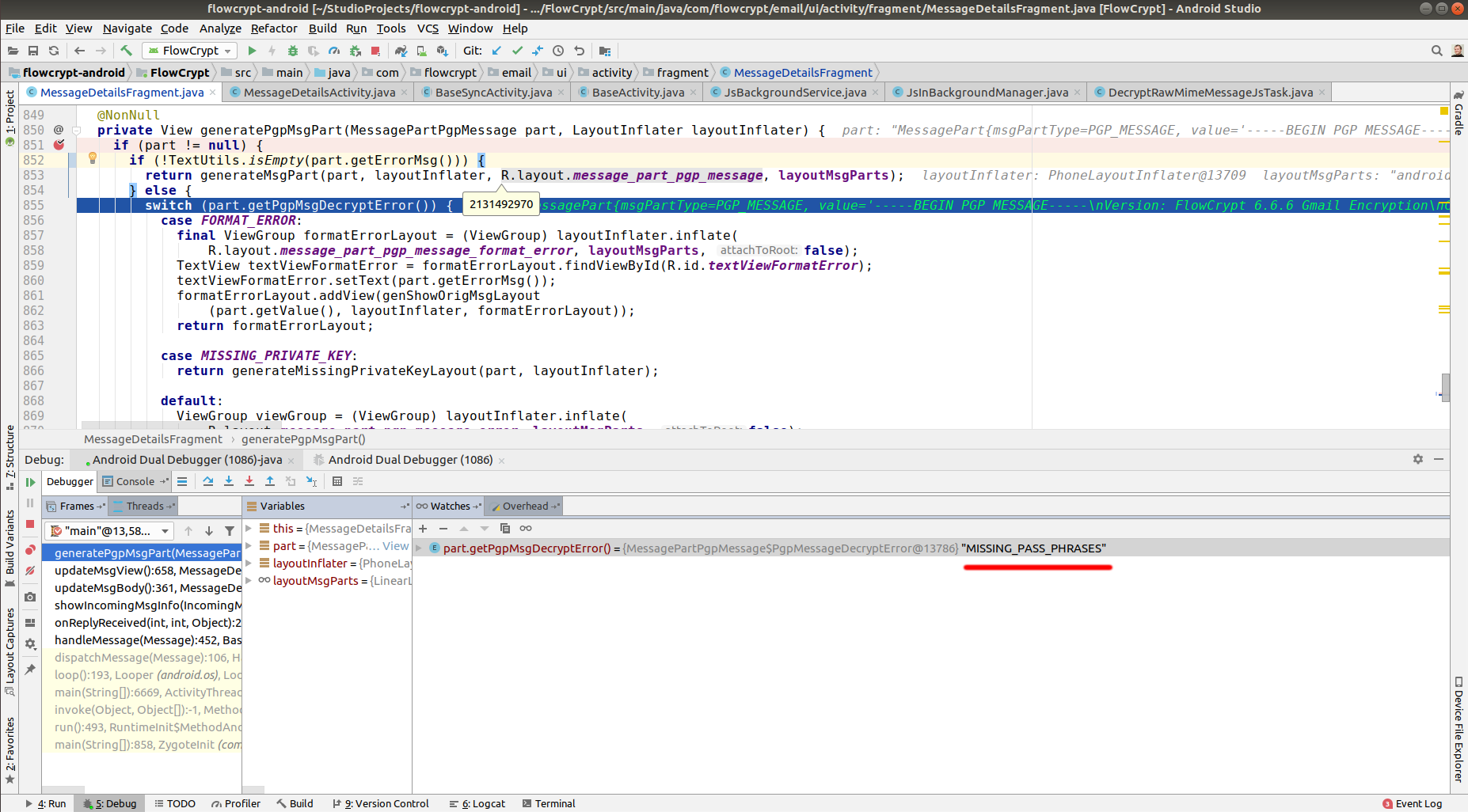
What should I show to a user?
tomholub commentedon Feb 27, 2019
Show it in red border on the left, and report to ACRA
tomholub commentedon Feb 27, 2019
We may need to add upgrades into automated tests, is it difficult to do upgrades as part of automated testing?
tomholub commentedon Feb 27, 2019
For example, we could start using 0.7.2 as a "legacy". Then we would have one test that re-uses storage from 0.7.2, with 0.7.3 code, so that it's forced to use migrations as a part of the test.
Next time we have 0.8.5, it would again test it with the 0.7.2 storage, open a few messages, etc. Is that possible?
DenBond7 commentedon Feb 27, 2019
Unfortunately, we don't have any text for that yet. (We haven't defined errorMsg for that)
flowcrypt-android/FlowCrypt/src/main/java/com/flowcrypt/email/js/tasks/DecryptRawMimeMessageJsTask.java
Line 226 in 33d14c3
tomholub commentedon Feb 27, 2019
Any string is fine as long as user can take screenshot. If the error is just a string constant, print the string constant
DenBond7 commentedon Feb 27, 2019
Yes. But it's a bit complicated. Because I need to prepare all the important things before running a test. For example, I need to have all files from data/data/com.flowcrypt.email for 0.7.2. Then I should replace all files in data/data/com.flowcrypt.email of the current app version. Then I can run the test.
tomholub commentedon Feb 27, 2019
Do you have to have the 0.7.2 files at all? Is there a way to just run the 0.7.2 app manually one time, then export the storage into a file?
Then during automated tests, you would just start 0.8.5 code with 0.7.2 storage and run the test. This way you force it to do migrations.
tomholub commentedon Feb 27, 2019
At the end of the test you throw away the updated storage, and re-use the old 0.7.2 storage on next test.
DenBond7 commentedon Feb 27, 2019
I can backup project files. But I think you a little don't understand how the current realization of tests works. Let me explain it. I create tests which are independent as more as possible. What does it mean? It means every test can be run any time as a unique instance. Every UI test is creating for some Activity to test its functionality. For example, I need to test Settings --> Keys.
flowcrypt-android/FlowCrypt/src/androidTest/java/com/flowcrypt/email/ui/activity/KeysSettingsActivityTest.java
Line 55 in 33d14c3
I do the following steps:
Clear the app settings (ClearAppSettingsRule). I need to have a clear version of the app to be sure that the test before doesn't affect the current test.
Add an account. Because I can't test the current screen without an active account (AddAccountToDatabaseRule())
Add test private keys to the local database (AddPrivateKeyToDatabaseRule())
After that manipulation, I have a version of the app which looks like the installed app. Such realization helps me run any test independently.
So if I want to test the migration I need to replace files for every test. I don't say that it's impossible. It's just not easy and hard to maintain sometimes.
Actually, we don't need to replace files. We just need to prepare the right environment for a test. (as I've described for
Settings --> Keys.)19 remaining items
DenBond7 commentedon Feb 28, 2019
tomholub commentedon Feb 28, 2019
I used
prodDebug, so I guess I wasn't getting ACRA for that reason - understood.ashleysommer commentedon Mar 15, 2019
I came here due to a google search,
I installed FlowCrypt Android v0.7.3 from the Google Play Store, I imported my private keys, and added my passphrases. The keys show up correctly in the Keys screen.
When opening any encrypted email sent to me, I am seeing:
Exactly like in that screenshot above.
I never used 0.7.2 and I haven't upgraded from an earlier version.
The FlowCrypt Firefox browser extension works fine, with the same private keys and passphrases.
tomholub commentedon Mar 15, 2019
@ashleysommer where did you import the keys from? Which software originally created the keys? Thanks for reporting this.
ashleysommer commentedon Mar 15, 2019
One key I created 3+ years ago, one key I created a couple of months ago, both using GnuPGP on Linux.
I imported them to FlowCrypt Android App by exporting from GnuPGP as ASCII-Armored text, copying them to my desktop clipboard, using a clipboard-sharing utility to copy the text to my Android phone clipboard, then using the Import from Clipboard option in the app.
The import process went smoothly, and the passphrase entered for the keys was correct.
Both keys (for two different mail accounts) show the same problem.
tomholub commentedon Mar 15, 2019
Is this a subkey only key export?
Please put your private key into FlowCrypt settings - additional settings - experimental - check compatibility. (on the browser plugin). Please copy what it prints out here, or send it to human@flowcrypt.com with link to this issue. Thanks!
ashleysommer commentedon Mar 15, 2019
This is a full key export, it includes multiple subkeys.
I've sent you an email to that address with the compatibility check output.
tomholub commentedon Mar 15, 2019
@ashleysommer The key looks usual based on the export. Would you be able to create a test key for us that resembles the key you have? Then you'd share the test key and test pass phrase with us, and we'll use it to debug the app. I know it's a big ask but if you could do it, that would be of great help! Please let me know.
ashleysommer commentedon Mar 16, 2019
Ok, I generated a new secret key using latest GnuPG v2.2.4 from Ubuntu 18.04, and sent it to that email address.
I used exactly the same process and tried to get the key and subkeys as close as possible in configuration to my other two keys.
I imported it to the Android app and it is showing the same "MISSING_PASS_PHRASES" message when I attempt to decrypt a message.
DenBond7 commentedon Mar 16, 2019
Hello @ashleysommer. Thanks for reporting this. We've found you use ECC keys. Unfortunately, the current realization which uses J2V8 does not support ECC keys. This issue will be fixed when we will use Node.js for message decryption. I hope it'll be soon :)
tomholub commentedon Mar 16, 2019
We aim to do that in upcoming update, in less than a month.
ashleysommer commentedon Mar 16, 2019
@DenBond7
Thank you for looking into this.
I thought it might be something along those lines.
I'm looking forward to the new release, and I will continue to use FlowCrypt just through the firefox browser extension until then.
DenBond7 commentedon Apr 22, 2019
Hello @ashleysommer. I'm happy to notify you that we've already migrated to use Node.js for all PGP actions. I hope now you can use the Flowcrypt Android app with no issues.